
Download ZygoteAI – Secure AI‑Powered Authentication Tool for Web Apps
Overview
ZygoteAI is a modern, AI‑driven authentication platform that brings together ease‑of‑use and enterprise‑grade security for web applications. Built for developers, SaaS providers, and small‑to‑medium businesses, the solution replaces traditional, often‑clunky login and registration flows with a clean, responsive interface that works across all modern browsers and devices. Users can log in with a simple username‑and‑password pair, while a built‑in email‑based password‑recovery workflow adds a second layer of protection without relying on costly SMS services.
New users enjoy a rapid one‑step registration process: an email address is entered, a verification code is dispatched, and the user then creates a unique username and a strong password. The platform ships with multilingual support—English is the default, and additional locales can be added via a straightforward configuration file. ZygoteAI’s AI engine continuously analyses login patterns, flags anomalous attempts, and prompts additional verification when risk thresholds are exceeded, effectively reducing credential‑stuffing and brute‑force attacks.
All communications are encrypted with HTTPS, data is stored at rest using strong encryption, and the solution complies with GDPR and CCPA, making it a trustworthy choice for privacy‑conscious organizations. Whether you are launching a brand‑new SaaS product or retrofitting an existing portal, ZygoteAI delivers a ready‑made, secure, and user‑friendly authentication layer that can be deployed in minutes.
Key Features
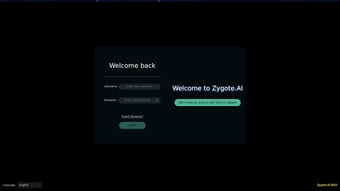
ZygoteAI packs a comprehensive set of capabilities designed to address the most common authentication challenges while staying lightweight enough for rapid deployment. The AI‑driven threat detection engine monitors login attempts in real time, automatically escalating suspicious activity to a higher verification step. The login flow is intentionally simple: a clean username and password form, optional “Remember Me” checkbox, and a clear “Forgot Password?” link that triggers an email‑based verification code.
Registration is streamlined into a single guided sequence—enter an email, receive a six‑digit code, then create a username and password—so users can get started quickly without navigating through multiple pages. Multilingual support is built‑in; English ships by default, and additional language packs (Spanish, French, German, Chinese, etc.) can be dropped into the /locales folder. All traffic is forced over HTTPS, and the system stores sensitive data encrypted at rest, ensuring confidentiality and integrity.
ZygoteAI meets GDPR and CCPA requirements out of the box, providing clear consent mechanisms and data‑export capabilities. The UI is fully themable via CSS, allowing you to match the authentication screens to your brand without touching the core code. Developers benefit from a well‑documented RESTful API, complete with Swagger UI, that covers login, registration, password reset, and user management.
Finally, the solution is designed for the cloud: a Docker‑compatible image and a Helm chart make scaling on Kubernetes painless, while Docker Compose offers a quick local setup for testing.
- AI‑Driven Threat Detection: Real‑time monitoring of login attempts with automatic escalation for suspicious activity.
- Simplified Login Flow: Username/password entry with optional “Remember Me” for faster access.
- Email‑Based Password Recovery: Secure, time‑limited verification codes sent to the user’s registered email.
- One‑Step Registration: Email verification followed by username and password creation in a single guided sequence.
- Multilingual Support: Built‑in language packs; English default, easy to add additional locales.
- HTTPS‑Only Communication: All data exchanges are encrypted, ensuring confidentiality and integrity.
- GDPR & CCPA Compliance: Data handling practices meet major privacy regulations, with clear consent mechanisms.
- Customizable UI Themes: CSS‑based theming engine lets you match authentication screens to your brand.
- Developer‑Friendly API: RESTful endpoints for login, registration, and password reset, with detailed Swagger documentation.
- Scalable Cloud Deployment: Docker‑compatible image and Kubernetes Helm chart for effortless scaling.
Installation & Usage Guide
Prerequisites
Before you begin, ensure the following components are installed on your server or development workstation:
- Docker Engine (v20.10 or later) – required for containerized deployment.
- Docker Compose (optional) – simplifies multi‑container orchestration.
- Node.js (v14+) – needed only if you plan to customize front‑end assets.
- An SSL certificate (Let’s Encrypt or commercial) – enables HTTPS.
Step‑by‑Step Installation
- Pull the Official Image: Run
docker pull zygoteai/authenticator:latestto download the pre‑configured container. - Create a Docker Compose File: Save the snippet below as
docker‑compose.yml:version: '3.8' services: zygoteai: image: zygoteai/authenticator:latest ports: - "443:443" environment: - TZ=UTC - EMAIL_HOST=smtp.yourmail.com - EMAIL_PORT=587 - [email protected] - EMAIL_PASS=yourpassword - JWT_SECRET=yourRandomSecret volumes: - ./data:/app/data - ./certs:/app/certs - Configure Environment Variables: Edit the
environmentblock to reflect your email server settings, JWT secret, and any custom options. - Mount SSL Certificates: Place your
.crtand.keyfiles in the./certsdirectory. The container will automatically use them for HTTPS. - Start the Service: Execute
docker compose up -d. Docker launches the container in detached mode, exposing port 443 for secure traffic. - Verify Deployment: Open a browser and navigate to
https://yourdomain.com.You should see the default ZygoteAI login screen.
Using the Platform
Once live, end‑users interact with two primary screens: Login and Registration. The login page asks for a username and password; if the user forgets the password, clicking “Forgot Password?” triggers the email‑verification flow. During registration, the user supplies an email address, receives a six‑digit code, and then creates a username and password.
All forms enforce client‑side validation (minimum 8 characters, at least one uppercase letter, one number, and one special character). Administrators can access a protected dashboard at/adminto view analytics, manage accounts, and adjust AI sensitivity thresholds. The dashboard also lets you upload additional language packs or switch UI themes without redeploying the container.Because ZygoteAI runs inside a Docker container, it is OS‑agnostic. It works on any modern web browser (Chrome, Firefox, Edge, Safari) and can be hosted on Windows Server, Linux distributions (Ubuntu, CentOS, Debian), or macOS. For on‑premise setups you may also run the image directly on Windows 10/11 using WSL2, making it flexible for both development and production environments.
Pros and Cons
Pros
- AI‑enhanced security that adapts to emerging threats.
- Fast, single‑page registration and login flows.
- Full HTTPS support out of the box.
- Easy Docker deployment—no manual dependency handling.
- Scalable architecture suitable for startups and enterprises.
- Comprehensive documentation and Swagger UI for developers.
- GDPR/CCPA ready with built‑in consent management.
- Customizable UI themes to match brand identity.
- Multilingual support for global audiences.
- Free community edition with optional paid upgrades for premium AI models.
Cons
- Requires a Docker‑compatible host; no native Windows installer.
- Limited out‑of‑the‑box social login options (Google, Facebook) – custom integration needed.
- Advanced AI tuning is part of the paid tier.
- Initial SSL certificate setup is manual unless Let’s Encrypt automation is configured.
- 2FA is available only as an optional plugin, not included in the core free edition.
Frequently Asked Questions
Is ZygoteAI free to use?
ZygoteAI offers a free community edition that includes core authentication features and AI‑driven threat detection. Paid tiers unlock advanced AI models, priority support, and enterprise‑level SLA.
Can I integrate ZygoteAI with existing user databases?
Yes. ZygoteAI provides RESTful endpoints and migration scripts that can import users from MySQL, PostgreSQL, MongoDB, or LDAP directories.
What languages are currently supported?
English is bundled by default. Additional language packs (Spanish, French, German, Chinese, etc.) can be added by placing translation JSON files in the /locales directory and updating the configuration.
How does the AI detect suspicious logins?
The AI model analyses IP geolocation, device fingerprint, login time patterns, and failed‑attempt velocity. When a risk score exceeds a configurable threshold, the system prompts a one‑time verification code sent via email.
Is there a way to enable two‑factor authentication (2FA)?
While the core product focuses on email‑based verification, a 2FA module is available as a plugin. It supports TOTP apps such as Google Authenticator and can be enabled via the admin dashboard.
Conclusion & Call to Action
ZygoteAI delivers a modern, AI‑enhanced authentication experience that balances simplicity with robust security. Its containerized architecture, HTTPS‑only design, and compliance‑ready features make it an attractive option for developers looking to replace legacy login systems without reinventing the wheel. Whether you are launching a new SaaS product or upgrading an existing portal, the free tier lets you evaluate the platform risk‑free, while paid plans unlock deeper AI insights and premium support. Ready to secure your users with intelligent authentication? Download ZygoteAI now and start protecting your application today.
ZygoteAI made implementing secure authentication a breeze. The AI‑driven threat detection caught suspicious logins instantly, and the Docker deployment was seamless.



.png)



